Showing posts with label computer tricks. Show all posts

Best 6 Windows 8 Apps

Posted by K. Swaviman 3 Comments

Windows 8 is the future. Yes it has some flaws and it is not sitting well with some users but you cannot deny that Windows 8 will all that is left after the dust settles - just like Windows 7. We have compiled a list of Best Windows 8 Apps that you would love to have. When Windows 8 was released the apps were few and far. However that has changed dramatically. The Windows Apps store is increasing by the day, and in June of this year it reached 250,000apps, just 5 months after it topped to the 200,000 mark.

1.TouchMe Gesture Studio (Free) 

The main purpose of TouchMe Gesture Studio is to let you to create, edit, and export a customized gesture file. It is an effort of Windows 8 to merge the old-fashioned desktop with touchscreen controls. You can choose from over 30 gestures. It would also allow you to roam your gestures around different devices. It would also let you to mimic keyboard shortcuts, switch between different apps and even adjust the volume.


2.Flipboard (Free)
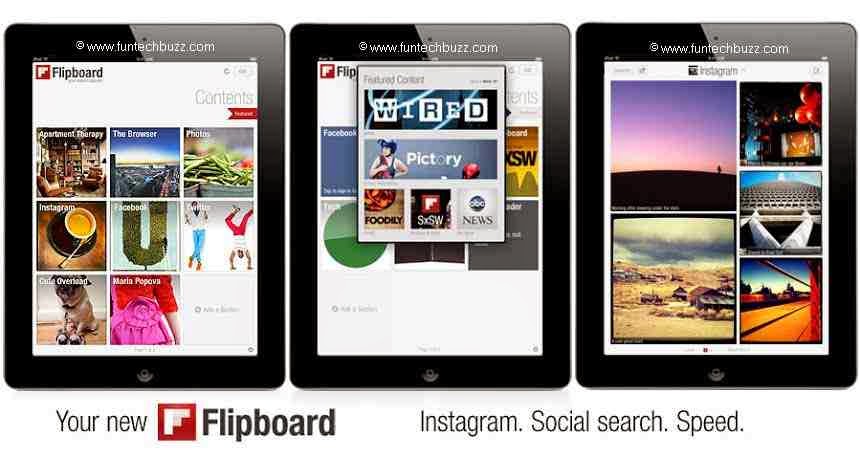
Flipboard is the most convenient way of personalizing your own magazine. So now on, it would not be difficult for you to keep track of the news you care about. You can easily read the news from all around the world and watch your favorite videos and photos that your friends are sharing. To begin with, just search for your favorite topics and add them to your newsfeed. You can even go through custom reading lists made by your friends or other users on Flipboard. If you come across anything you like, just click the “+” button. You can also connect Flipboard up to 12 social networks.

You may also like: Benefits of Google Drive other than cloud storage

3.MetroTube (Free) 

MetroTube is the most famous app of YouTube which is now available for Windows 8. You would love its new modern look. It can stream videos in HD, full HD and HQ. The main hub is easily customizable. You can also search videos, access subscriptions, and watch later feeds. You can use it for video sharing as well. 

4.Asphalt8: Airborne (Free)

If you are into arcade racing games then you will have an experience of your life with Asphalt 8. It is definitely an intense driving experience with fabulous graphics. It features 47 high-performance vehicles with 80 % new automobiles. They have incorporated high-fidelity car motor sounds which gives them a very realistic effect. You can either play on your own or enjoy playing a multiplayer game.

5.FreshPaint (Free) 

Fresh paint is the perfect canvas for your abstract ideas. This user friendly app will let you use all the tools that you require for painting. It doesn’t matter if you are an artist or a hobbyist, this app would let your dreams of painting come true. You can use different mediums like oil painting, water colors, pencils etc. If you like you can turn real photos into paintings as well! You can blend different colors to get the color of your own choice. So let your creative side begin the work! 

6.Fhotoroom(Free)

Fhotoroom will take editing of pictures to a new level. It is the most powerful app available for editing your pictures. By using this app you can even share your edited photographs with the other photography lovers. It supports more than 150 RAW file formats. It has 90 editing tools which let you to crop, rotate, correct color and exposure, flip the tools etc.
Also Read: How to use google maps without internet


Guest Author: Nuur Hasan
About the Guest Author:
Nuur Hasan is a software developer, web developer and a technical writer with more than seven years of experience. He believes that sharing knowledge can do wonders and that is why he likes to blog. His other interests include politics and sports
Read More

Multiple Desktop switcher software for Windows 7 & 8

Posted by K. Swaviman
Dexpot is a virtual desktop manager which allows user to work with multiple destop windows at a time smoothly under one pc. It creates some additional workspace for you and you can switch over to any of them very easily. For a simple example with this multi desktop switcher you can browse internet and listen to music in Desktop 1, play a game in Desktop 2, opened a word file in Desktop 3 & opened some other software or app in Desktop 4 & simultaneously running all of them without overlapping or any interference. Separate wallpaper, separate screen saver and different icons and start ups can be seen for each indivisual desktop you have added with the help of Dexpot.Even task manager can show separate running apps at different windows.

Here are some usage of Dexpot: 


1.4 desktops at a time.

2.It makes your work distraction free.

3.Processing will be divided and work with ease.

4.You can move any programme or app running in one desktop to the other simply by dragging and dropping.

5.Best for laptops when you need to keep an eye upon more than one interfaces or more than one processes going on in multiple pcs.

6.Best high end use of it can be found in steel plants which adopt automation & in house hold use or small scale usage from IT firms to personal use.

N.B.: Find the screen shots of this software at the end of this post.

Advantages:

1.Easiest way to switch over between desktop interfaces.

2.Most helpful for industries where automation software like SCADA, DCS etc are used.

3.No chance of interference.

4.In case of destops one may manage to add several monitors to work with, but this (Dexpot) can be the best solution for them who use a laptop & still want to work with several work stations.

Also Read:

Mass Euphoria about online shopping in India! 

SCREEN SHOTS OF DEXPOT:


Read More

Best way to avoid spam mails

Posted by K. Swaviman
best-disposable-emails-to-avoid-spams
Now a days spams in the inbox of any active e-mail account is a very common and annoying problem. Also for some reason or other almost all the websites demand your email address for their services. So getting their promotional mails as spams are very common. To get rid of such irritating spams i.e. to block spam permanently we have listed some disposable email services which if used can help you out. Other than this it has other advantages too. So let us see.

Disposable emails can be used in places where you have to enter your email once for getting any service and you don’t want to get any further mail from that site or person. These are nothing but the email alias of your own email address(es). Sometimes while buying from some online stores or while accessing any document in any site or it may be due to some free email accounts providers, you need to enter your very own email address & this is used by them to send you promotionals. If you input a disposable email address in such places then it will act as your original email id for those sites but they will not be able to send you any further emails as your identity becomes completely hidden here. But most of the disposable emails expire after some specified time duration (it may be 12 hours or it be 1 month). 
Here are some of them you can trust:


Using this fake email generator you can get rid of spamming the inbox to a great extent. It is one of the most used disposable email services.

This is another disposable email provider. It offers free email accounts to its users using which you can create any number of temporary mail ids to share with such indivisuals from whome you don’t want to receive emails.

AIRMAIL

This one is what we prefer most of the time. Because of its simplest interface and user friendly usage it has gain a massive popularity.

You can use temp mail also. It has an interface similar to an email inbox. Very easily you can change addresses and keep a track on the in coming mails to that email id. You can select its validity from 6 hours to 24 hours. After 24 hours the temporary email address will expire and all your spams too.

In this post post we have tried best to inform you some of the good temporary email providers. We might have missed some of them. If you have anything to express regarding this article please do comment.


Also Read:

Difference between Ultrabook, Netbook and Notebook

Read More

Difference between Ultrabook, Netbook and Notebook

Posted by K. Swaviman 5 Comments

netbook, notebook, ultrabook
Many of us are confused with the terms notebook, netbook & ultrabook. Some of us even don’t know which type of laptop they are having. So here we have listed some key features which makes each of them different from the others. Following these, you can easily make difference between notebook, netbook & ultrabook. Now if you ask the difference between notebook and laptop then I can only say that in this 21st century there is almost no difference. But years ago, notebooks used to be thinner and smaller screen sized devices mainly designed for portability whereas the laptops used to be simply the substitute to desktop in terms of mobility. In those days laptop computers were having more features than any notebook. But now time has changed.
So following are the key differences between the above mentioned threes.

NETBOOKS:


net book
Netbooks are small, low cost, low weight & compact laptop computers. As per the Wikipedia “Netbooks are a category of small, lightweight, legacy-free, and inexpensive computers.” These are mainly designed to give the laptops more portability and to make it light weight along with a low cost pc. These don’t have CD-Drives, platter hard disks, Ethernet cables and extra peripherals. For them who only surf in internet & do light works like listening to music or writing a document, netbook is the best preferable one. Netbooks have lesser computing power than notebooks.

NOTEBOOKS:


best notebook
These are designed to provide a perfect substitute to the deskies which can handle almost all the works that a desktop can do. These have a high speed processor & hence a higher energy consumption than netbooks. Notebooks come with a wide screen & more number of peripherals including CD-Drive, Ethernet ports etc. Hence they carry a higher cost too.
One of the major differences between netbook & notebook is, Netbooks are meant for internet related activities like surfing on internet or emails etc. whereas Notebooks are designed for handling most of the computational works a desktop does. CNET has concluded that “netbooks are smaller, cheaper notebooks. They are having so similar specifications that for a general shopper there really is no distinction between the devices.”

ULTRABOOKS:


Ultra book
Ultrabook is the high end subnotebook designed to add various features along with an increased battery life to the laptop. To be more specific it is a trademark brand name by intel. Due to their compact size they too lack some of the notebook features, but still have more features & efficiency than netbooks. 


So if you are a heavy gamer or user of number of apps and softwares then you should always go for a notebook. If you have nothing to do with the latest softwares, netbook is the option. But if you are looking for a versatile device with low budget and high performance then the ultrabooks will be your best companion.

Also Read: 

Benefits Google Drive other than cloud storage

Read More